.svg)
Using static thresholds to check machine behavior makes hardware development a lot easier, but isn’t always possible.
Using static thresholds in hardware iteration is ideal, but what happens when they’re not available?
A test ends, telemetry comes through, and the question in review is always the same. Did this run behave like the runs that came before?
Using static thresholds to answer this question would be ideal. But static thresholds can be hard to come by for a variety of reasons:
- The machine is early in development, so there’s no definition for nominal.
- The system is complex and/or transient in nature, so you need real data to derive static/numerical thresholds.
- Your criteria is historical data, not something derived from analysis (for example, “Have we seen this before?” versus “This is bad and we know it’s bad”).
So what happens when static thresholds can’t be defined? Or, even if they could be defined, how is the next engineer going to inherit the context behind that static threshold?
For years, comparing test runs has meant the same manual routine: pulling data into one-off Python scripts, overlaying data with custom tools, breaking out Excel, and eyeballing whether a new run looks good. Using multiple applications to do this manually works for an afternoon. But this workflow doesn’t scale across a campaign; it doesn’t carry forward to the next engineer or the next team, and critical context about why a test didn’t make it is lost.
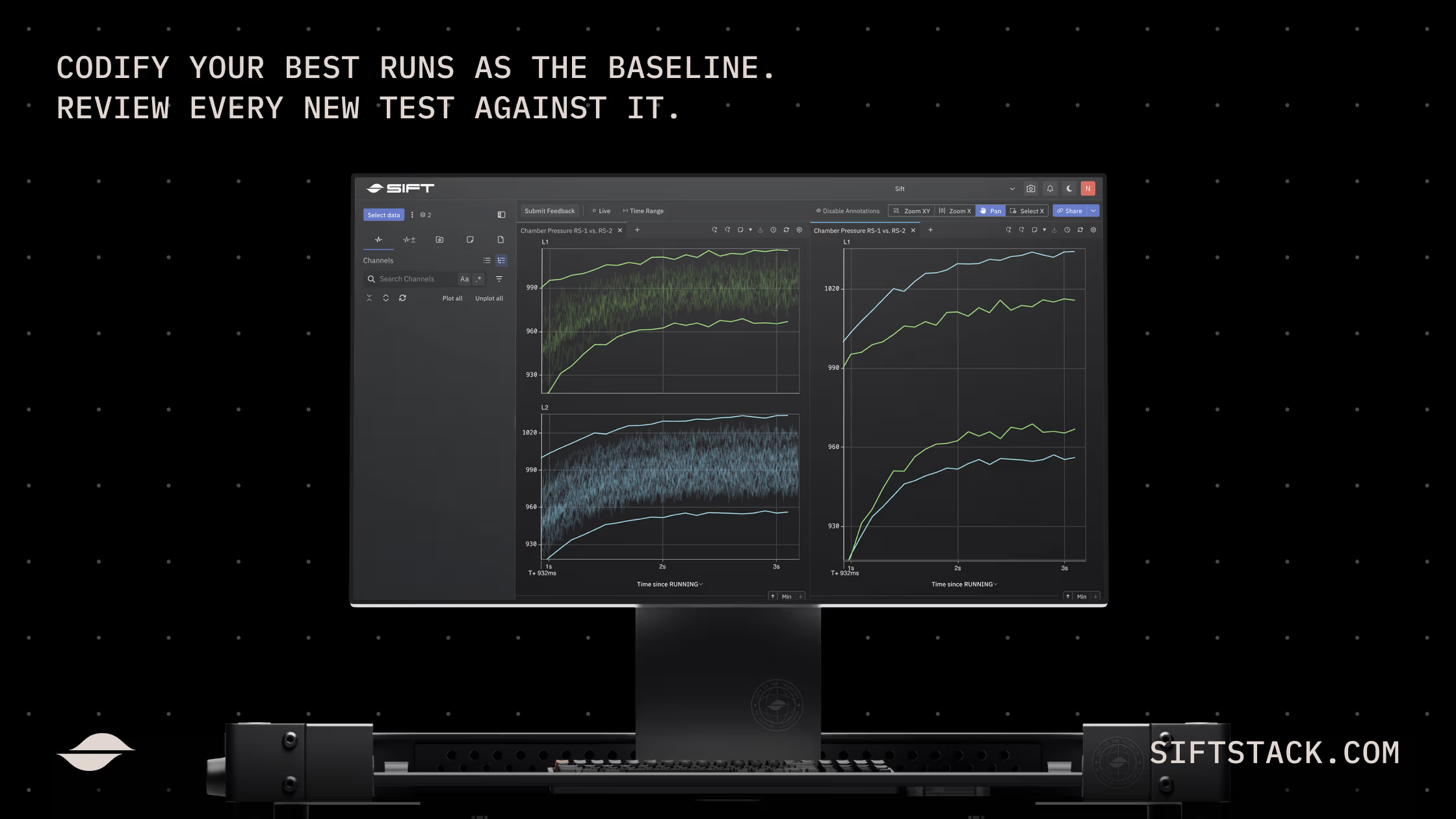
But what if, instead of overlaying and comparing data manually, you could review your latest test against the behavior of your best runs? And what if those comparisons could be done automatically, every time?
Accelerate your data review workflow with Sift Families.
This pattern shows up across every test-heavy engineering team we work with: aerospace, defense, propulsion, energy. Different hardware, same problem. Static thresholds lack context, and manual workflows don’t scale. To fix this exact problem, Sift built Families. Upgrade the manual workflow that you’re otherwise doing by hand: curate a set of representative test runs, align and compare against them, and operationalize that comparison so the next run gets reviewed the same way.
Curate your best runs, align them on the event that matters, and let Sift compute the baseline.
A Family is a curated collection of solid test runs. These runs represent how the hardware is supposed to behave. You pick Family members directly, or write a candidate query in CEL that surfaces matching test runs as they land. A Family stays curated over time. New runs that meet the criteria get reviewed and accepted before they join the baseline. The point of a Family is that every run inside it represents nominal behavior.
Test runs happen at different wall-clock times, but you’re probably more interested in the same operational phase across runs. Family Data aligns members to annotations the engineer chooses: Startup, Running, Shutdown, or whatever events are relevant to your workflow (the moment a heater engages, when a vehicle enters cruise, and so on). Aligning by event rather than clock time is what makes a Family comparable in the first place. Members missing a referenced annotation get excluded cleanly, with the platform showing which runs contributed.
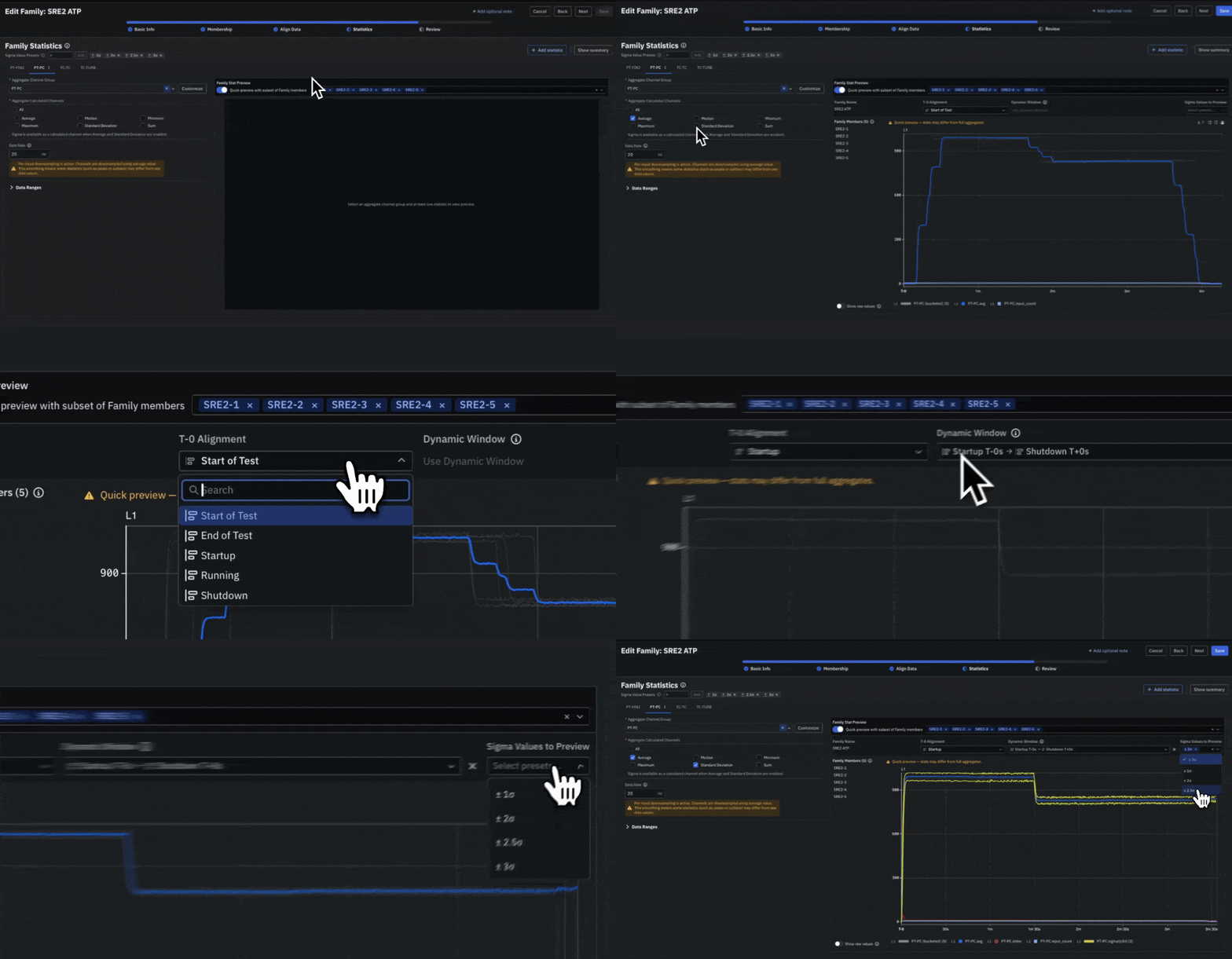
Once a Family is aligned, Sift computes Family Statistics across every member. Minimum, maximum, average, and standard deviation, at the rate you specify. The output is a baseline you can plot, hover, and inspect, not a static lookup table. You can scope statistics to a fixed time window or to a dynamic window defined by annotations, so a 90-second test and a 180-second test both contribute their full active phase. The result is an expected operating envelope, visualized as sigma bands, built from the runs you trust.
Visual review in seconds. Automated review the moment new data lands. The baseline grows with the campaign.
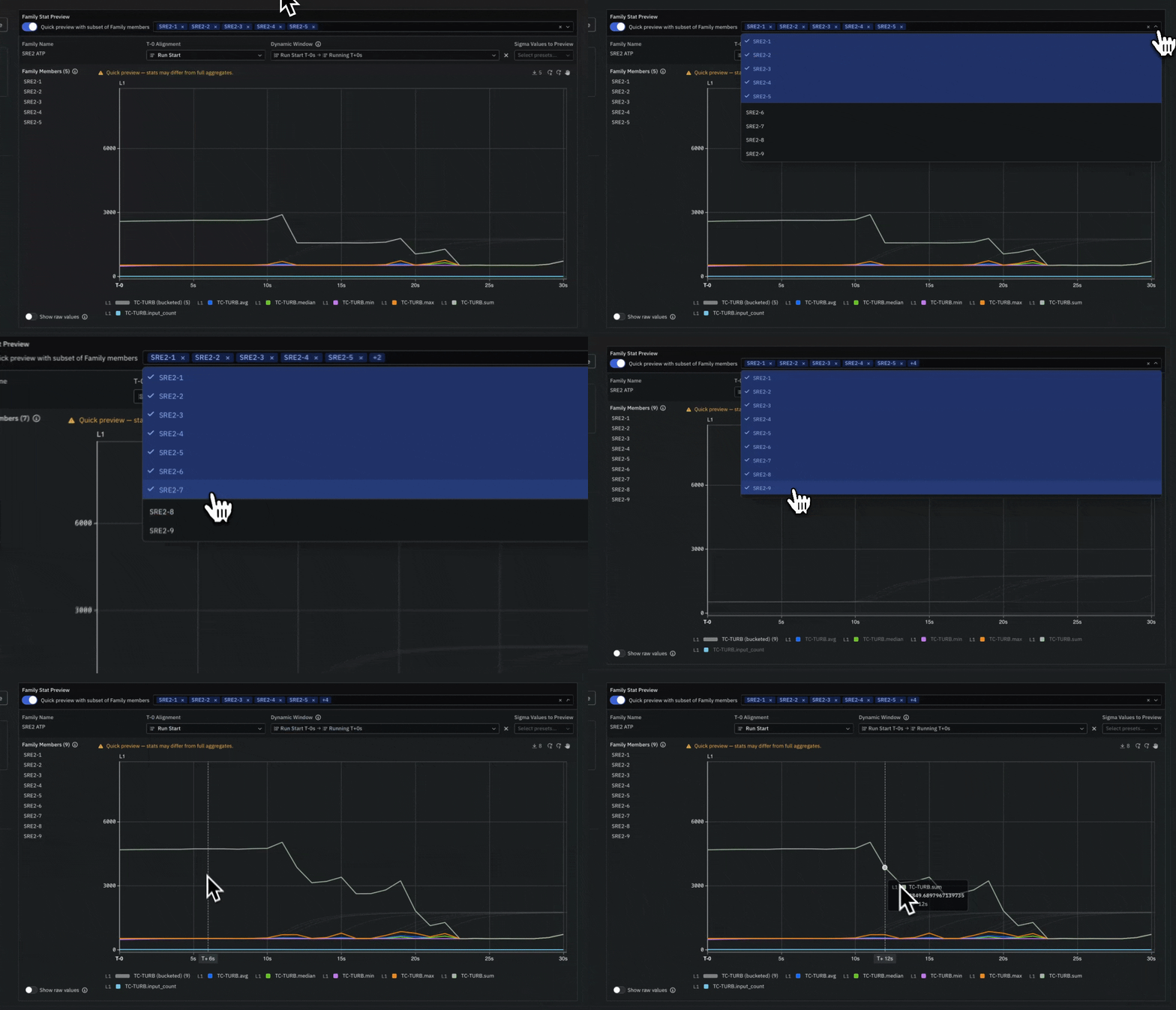
Now, let’s say that you’ve iterated on the machine and need to test it against previous baselines to make sure other previously nominal subsystems aren’t impacted. To check this with Family Data, open any chart in Sift. Load a Family as a data source and every member plots together, aligned on the event that matters. Outliers on your new, candidate test run show up in seconds, not after an afternoon of overlay work. The expected envelope plots alongside as sigma bands, so a new run gets reviewed against actual history.
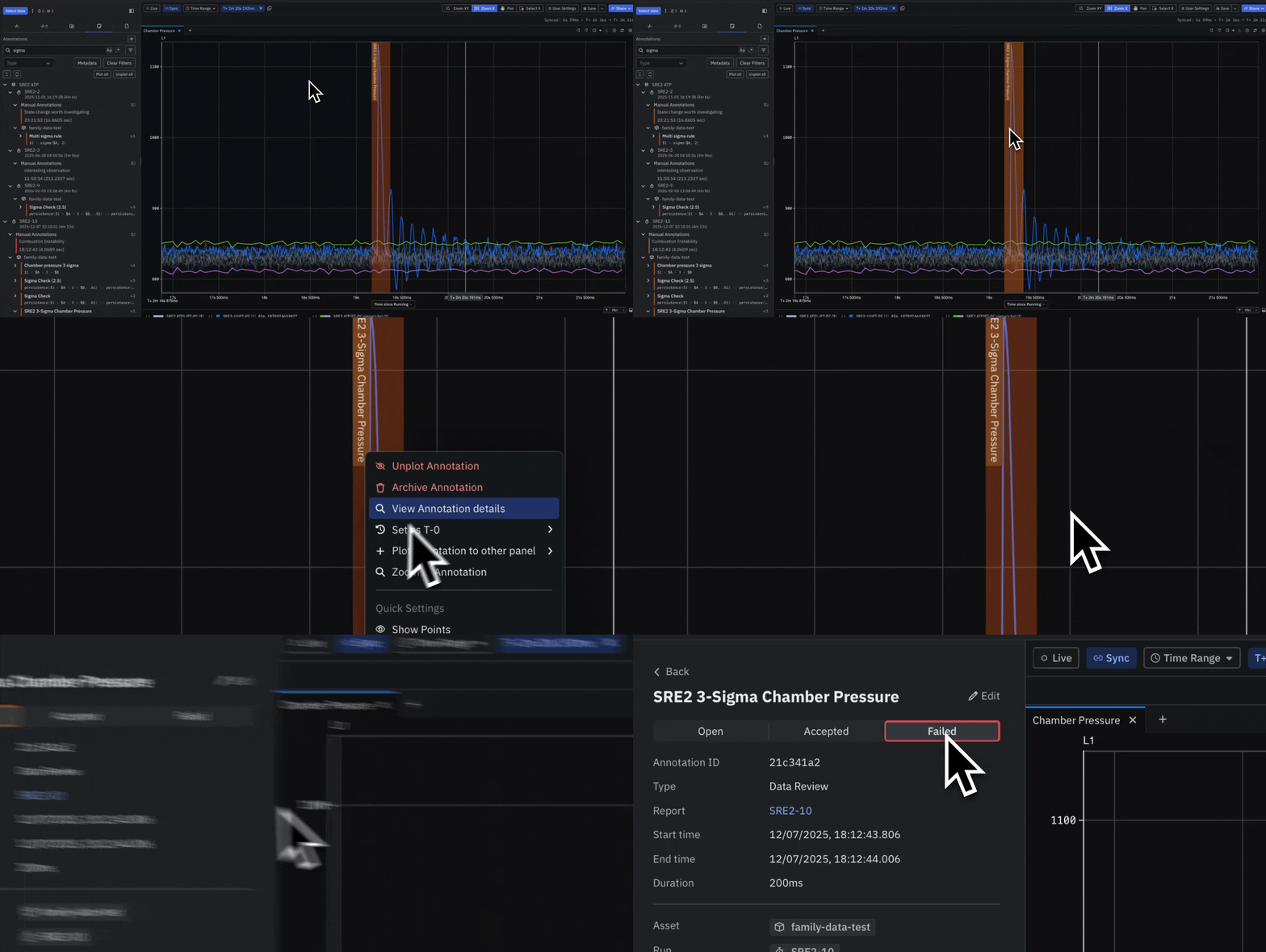
The same statistics drive automated review. Engineers reference a Family’s statistics as the threshold for evaluating new runs. A test ends, data comes through, and Sift evaluates the run against the Family’s sigma bands (or any other desired statistic) the moment it arrives. The result is a per-run, per-channel report with pass or fail annotations on the regions that deviated. The threshold updates as the Family grows. The criteria never has to be rewritten.
Sift Families ultimately helps you accelerate test cadence in three ways:
- Your team scales review past manual visual inspection
- Your baseline adapts as new runs join the Family, with no threshold maintenance
- Your best engineer’s judgment lives in the platform, codified once, evaluating every test the same way
Encode the judgment once. Review every test the same way. Never manually eyeball a post-test review again.
Hardware programs run on cadence. Cadence creates volume. Volume breaks manual data review processes, creating bottlenecks and slowing your team down. When you’re able to better leverage your own historical data as a baseline and compare every new test against it, it looks a lot like Sift Families. Instead of your best engineer eyeballing reviews manually, criteria can be written once and now the platform does the comparison every time.
Start by picking the runs that represent how your hardware is supposed to behave. Then accelerate and automate your data review. Want to see how Sift Families changes your workflow? We’d love to hear from you.
FAQ
How do you compare hardware test runs without static thresholds?
When you don’t have fixed pass/fail limits, you compare each new test against a baseline built from your known-good runs instead. You curate a set of nominal runs, align them on the same operational event, and measure every new run against the statistical envelope they form. In Sift, this is done with a feature called Families, which turns your best historical runs into a living baseline.
What is a nominal baseline in hardware testing?
A nominal baseline is a set of test runs that represent how your hardware is supposed to behave, used as the reference for reviewing new tests. It’s useful when a system is too new, too complex, or too transient to define numerical thresholds up front. A Sift Family is a curated collection of these nominal runs, where every member is reviewed and accepted before it joins the baseline.
How do you automate post-test data review?
You automate post-test review by defining review criteria once, then having the platform evaluate every new run against it as data arrives. With Sift Families, a test ends, telemetry comes through, and Sift automatically checks the run against the baseline’s statistical bands, returning a per-run, per-channel report with pass or fail annotations on the regions that deviated.
What can replace Python scripts and Excel for test data analysis?
Teams typically replace one-off scripts and manual overlays with a platform that groups, aligns, and statistically compares runs in one place. The manual routine of exporting to Python, overlaying in custom tools, and eyeballing results in Excel works for an afternoon but doesn’t scale across a campaign or carry forward to the next engineer. Sift Families are built to replace that workflow with a repeatable one.
How do you keep test review consistent across engineers and scale it as volume grows?
You make review consistent by encoding your best engineer’s judgment into the platform once, so every test is evaluated the same way regardless of who runs it. This matters because cadence creates volume, and volume breaks manual review. With Sift Families, the criteria lives in the platform, the baseline adapts as new runs join, and no one has to maintain thresholds by hand.